Try the demo
CRM for real estate agents

Every client, every deadline, every follow-up. On one ring.

KeyRing tells you who to call today, tracks every contract date from accepted offer to closing, keeps documents on each client's card, and shows you who actually sends you business.

The demo is password protected. Request access and you'll get the password right away.

KeyRing on a laptop: the task list on the left with today's follow-ups, and Daniel Alvarez's client card showing his next task, last contact, closing date, contact buttons, deal details and attached documents.
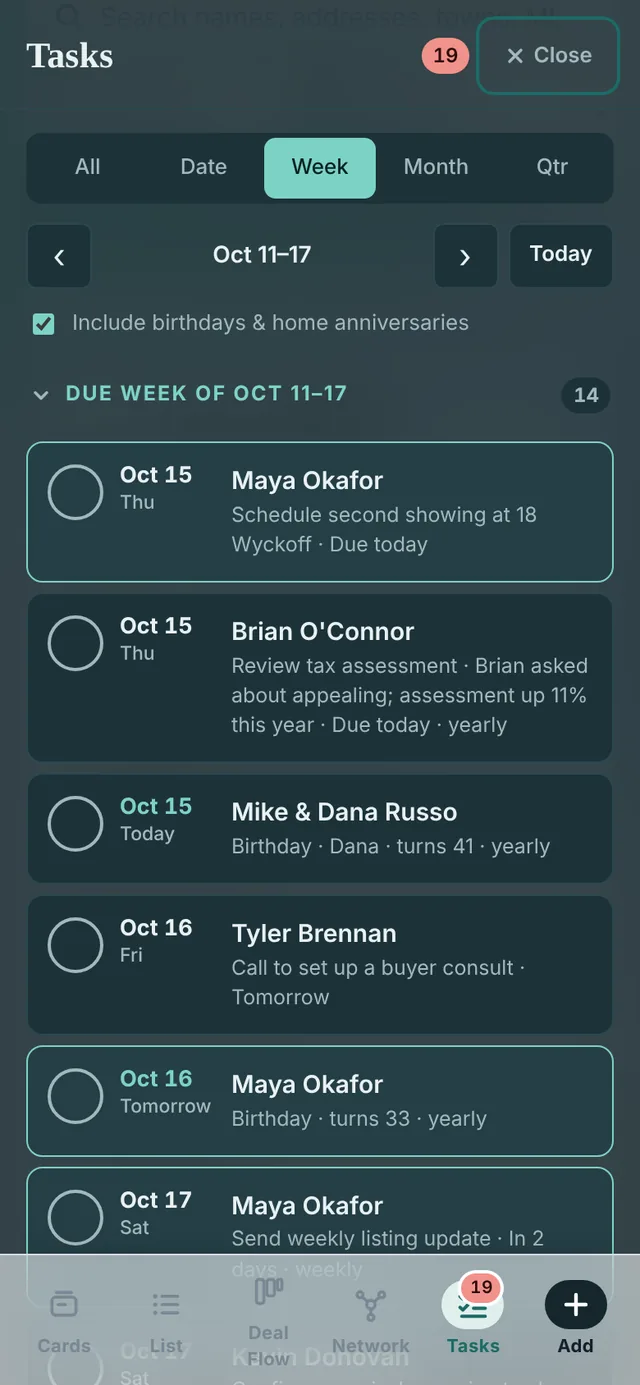
KeyRing's task list on a phone, showing this week's follow-ups.
  1. Today's listWhat's due, what's overdue, and who you haven't talked to in a while.
  2. One card per clientNext task, last contact and closing date at a glance, with call, text and email one tap away.
  3. Documents on the cardPre-approval, contract and inspection report live with the client they belong to.
Your day

Open it in the morning. Know exactly who to call.

The task list sorts itself into three piles, so nothing hides at the bottom of a long list.

  • Due: follow-ups, contract deadlines, birthdays and home anniversaries for the day, week, month or quarter you pick.
  • Overdue: anything that slipped, oldest first.
  • Haven't talked in a while: clients past the check-in rhythm you set for them, every 2 weeks for active buyers or every 90 days for past clients.
DateWeekMonthQuarter
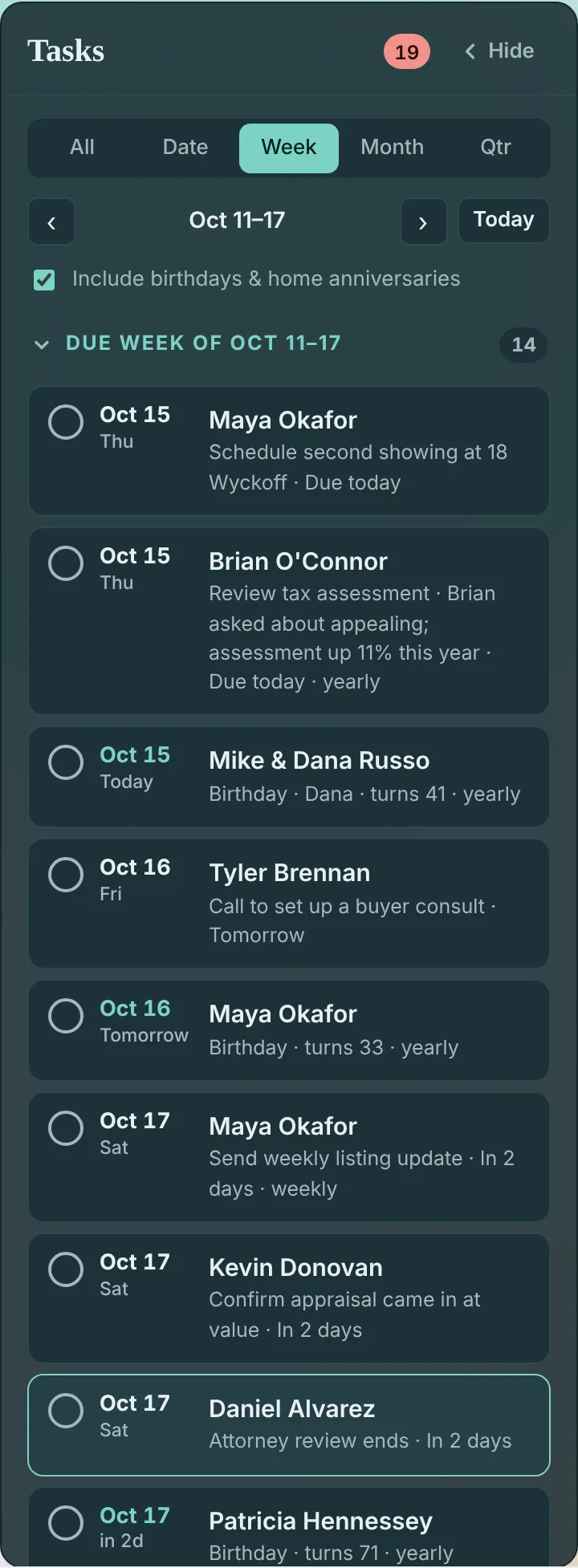
The Tasks panel set to this week: a Due section listing a second showing, a tax assessment review, birthdays and calls to make, with check-off circles beside each.
From accepted offer to keys

Enter the contract dates once. KeyRing watches them for you.

Each date you add to a deal becomes a task that shows up on the right day. Check it off when it's done. When the deal closes, the closing date becomes a yearly home anniversary reminder.

Dates on every deal
  1. Attorney reviewThe window to review and amend the contract
  2. InspectionDeadline to inspect and ask for repairs
  3. HOA / condo docsTime to review the association's documents
  4. AppraisalThe lender's check on value
  5. Mortgage commitmentThe lender's formal loan approval
  6. Final walk-throughOne last look before closing
  7. ClosingKeys in hand

Need something else, like a septic certification? Add your own deadline and it's tracked the same way.

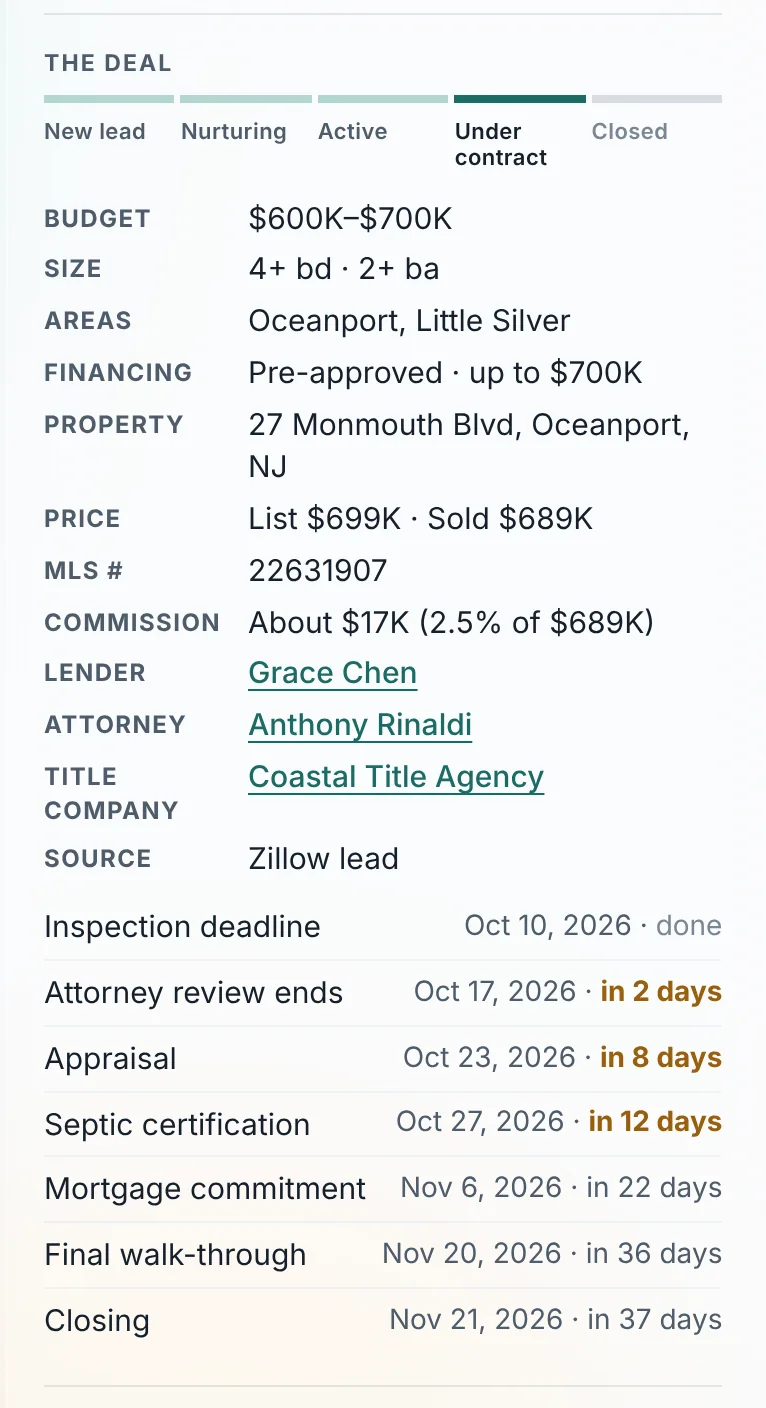
The Deal section of a client card: a pipeline stage bar set to Under contract, budget, financing, property, price, commission, linked lender, attorney and title company, and the contract dates with how many days remain.
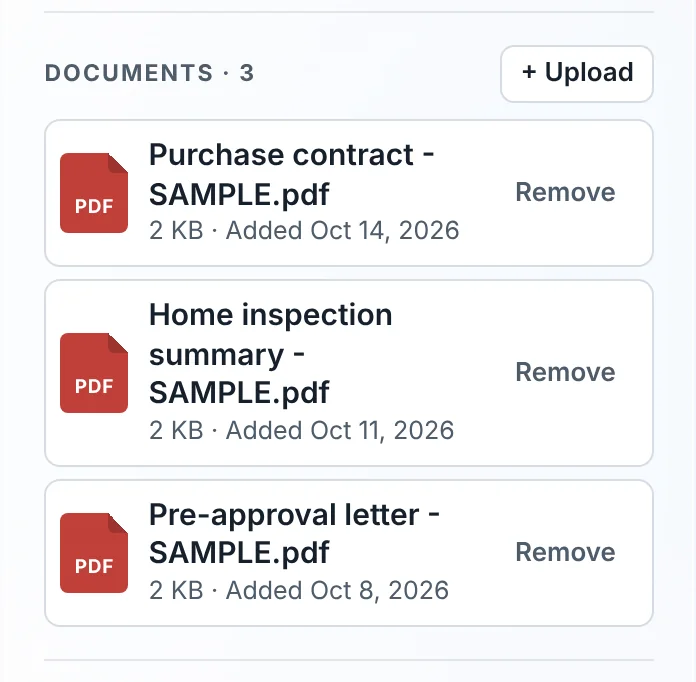
The Documents section of a client card listing a purchase contract, a home inspection summary and a pre-approval letter.
  • Documents on the card. Upload the contract, inspection report or pre-approval, or snap a photo from your phone.
  • Your team, linked. Lender, attorney and title company each have a card, so you can see every deal they're on with you.
Deal Flow

Your whole pipeline on one board.

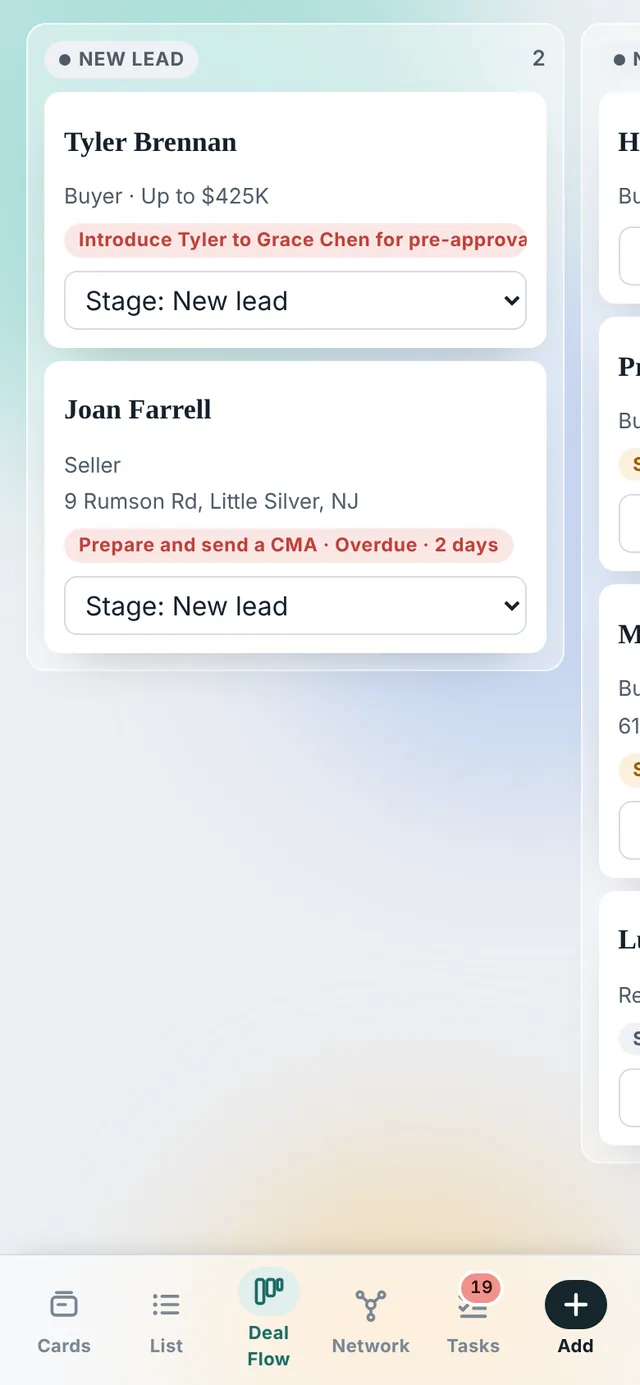
Drag a client from new lead to closed, or pick a stage from the card. Each column adds up its expected commission, so you can see your month at a glance.

New leadNurturingActiveUnder contractClosed
The Deal Flow board with columns for New lead, Nurturing, Active and Under contract. Each client card shows the client type, budget or address, the next task, and a stage picker.

See it with real-looking clients. The demo comes loaded with buyers, sellers, deadlines and documents.

Network

See who really sends you business.

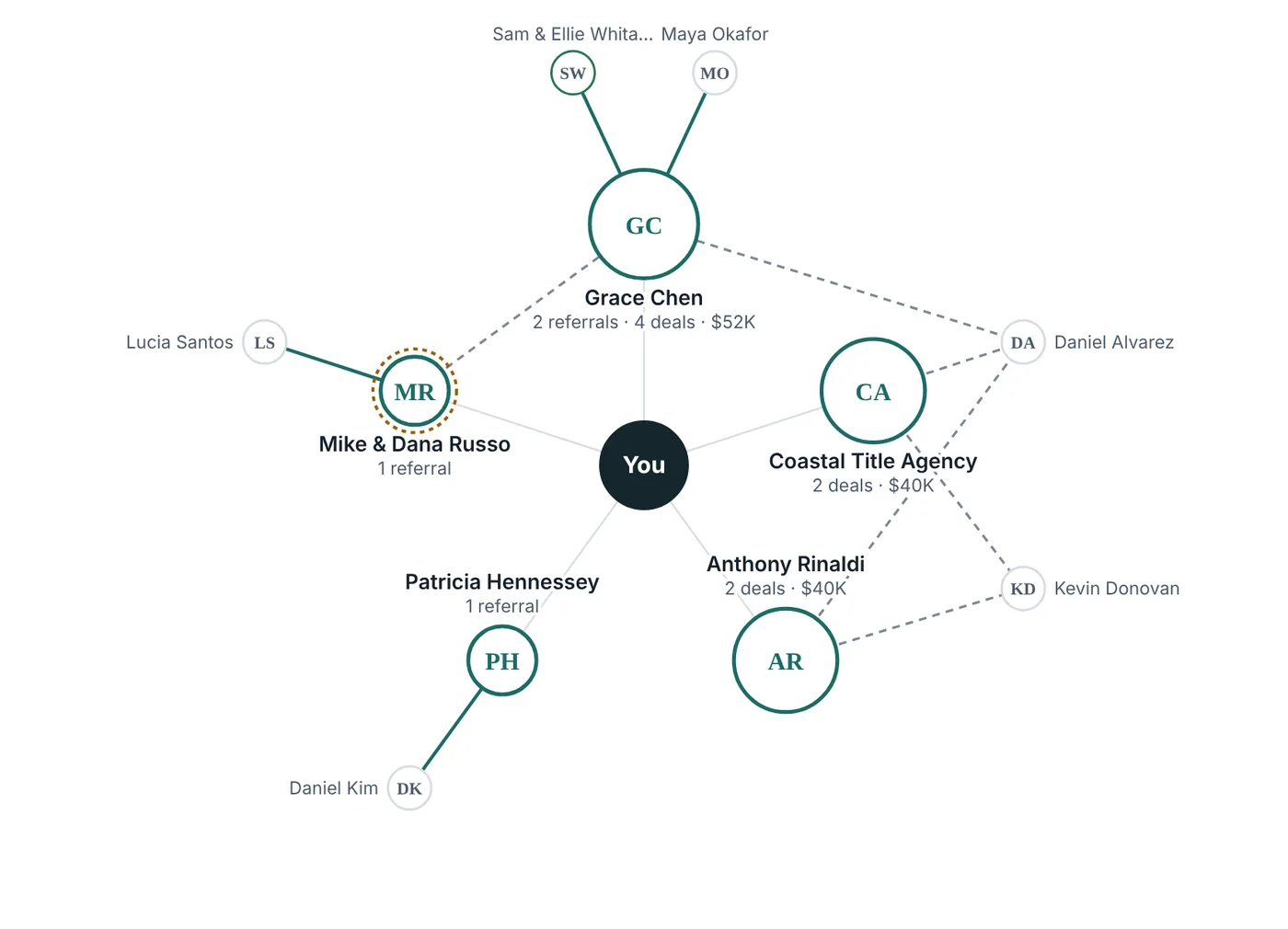
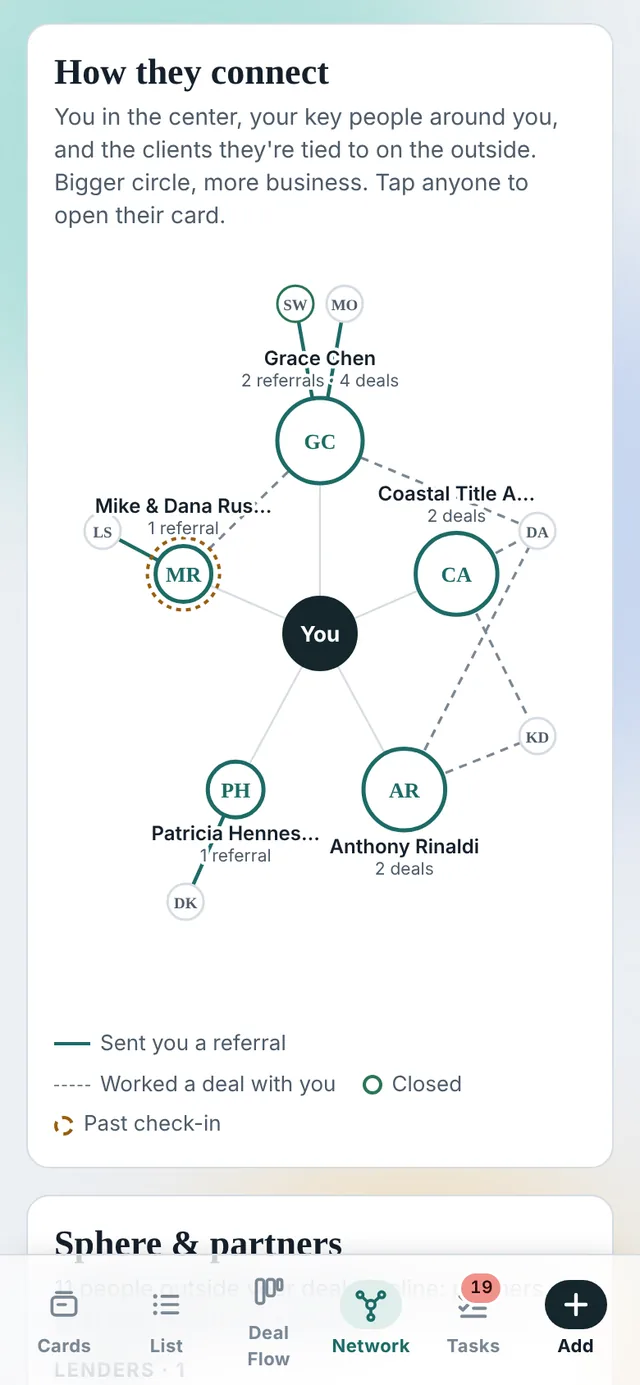
KeyRing draws your network from the links you already make on cards: who referred a client, and which lender, attorney and title company worked the deal.

  • Key people ranked by referrals sent, deals worked together and commission.
  • Going quiet? A ring marks anyone valuable you're past due to check in with.
  • Sphere and partners grouped into lenders, attorneys, vendors, past clients and friends.
A network map with You at the center, five key people around you sized by the business they bring, and the clients they connect to on the outer ring.
Stay remembered

The details that turn one sale into referrals for life.

Past clients remember the agent who remembered them. KeyRing keeps the dates and the follow-up rhythm so you don't have to.

Birthdays & home anniversaries

Add them once and they come back every year, with the milestone noted: "turns 41" or "5 years in the home."
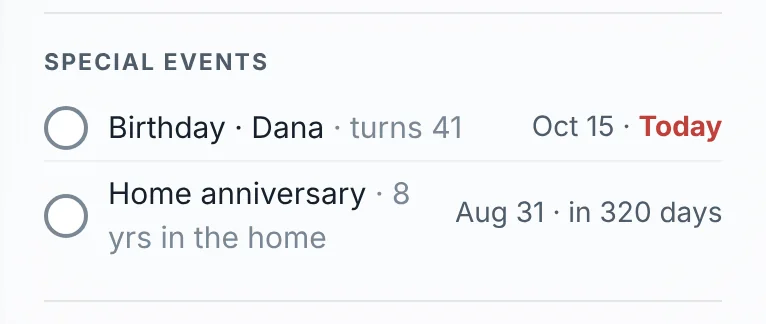
A Special events list showing a home anniversary and Dana's birthday with how many days away each one is.

Yearly tax assessment review

A reminder on each homeowner's card to check their assessment every year, with room for the block, lot and appeal deadline.
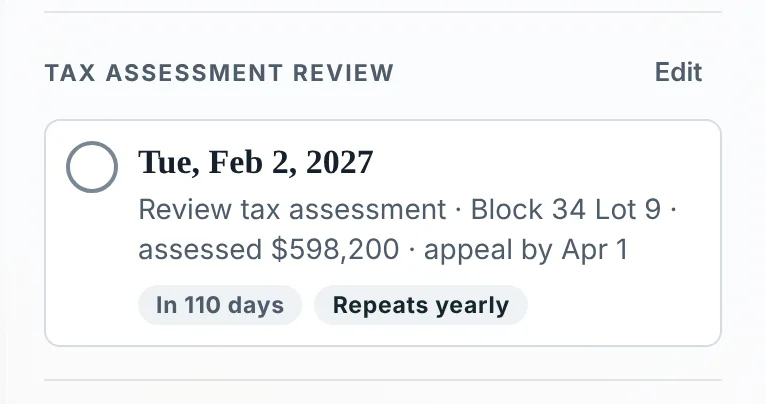
A Tax assessment review reminder for February 1 that repeats yearly, noting the block, lot, assessed value and appeal deadline.

Follow-up plans

Start a plan and KeyRing schedules the touches for you.

  • New lead 5 touches · 30 days
  • Listing launch 5 touches · 30 days
  • After closing 4 touches · 6 months
  • Stay in touch quarterly + yearly
On your phone

Built for the car between showings.

KeyRing runs in your phone's browser, so there's nothing to download. Add it to your home screen and it opens like an app. Tap to call or text, check off a task with your thumb, log a showing on the way out, and photograph a document right onto the client's card.

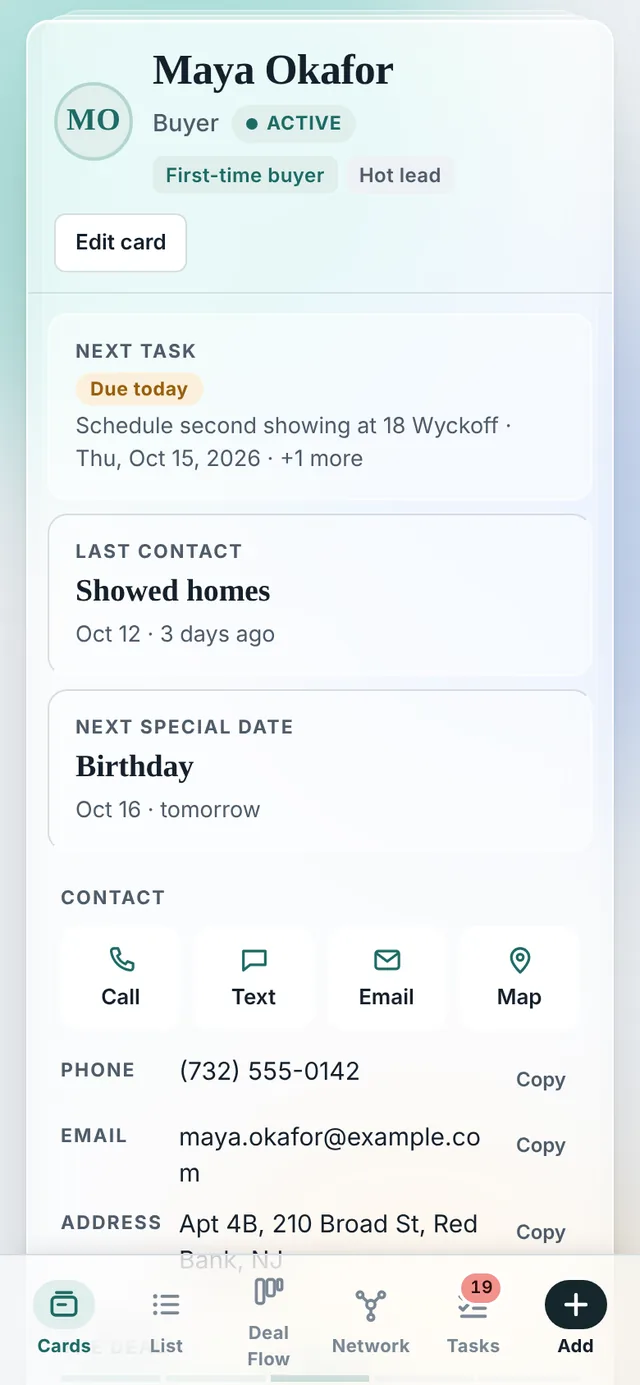
A client card on a phone with next task, last contact, next special date and Call, Text, Email and Map buttons.
Client cardCall, text or email in one tap
A buyer's card on a phone listing three homes shown, each rated Loved it, Maybe or Not for them with notes, and the contact log below.
Showings & logNotes from every visit and call
The Deal Flow board on a phone, swiping between stage columns.
Deal FlowSwipe through your pipeline
The network map on a phone.
NetworkYour referral partners at a glance

Showing notes

Log each home you show and whether they loved it, are on the fence, or passed.

Check-in rhythm

Set how often to reach each client and get flagged when it's been too long.

Search everything

Names, addresses, towns, MLS numbers, lenders, notes and document names.

Start a deal anytime

When a friend says "we're thinking of selling," one tap puts them in your pipeline.

Bring your list

Import contacts from a spreadsheet, and export your whole book whenever you want.

Contact log

Every call, text, letter and meeting, with your notes, in one timeline per client.

Questions

What agents ask before they switch.

Who can see my clients?

Only you, and anyone you choose to share your KeyRing with. Your clients are yours, and we never sell or share your contact list.

Can I bring my contacts from my current CRM?

Yes. Most CRMs can export your contacts to a spreadsheet, and KeyRing imports that file. It matches columns like name, phone, email, client type, stage, tags and birthdays.

Can I take my data with me?

Anytime. Export your whole book to a spreadsheet with one click, including deal details, dates and your last contact with each client.

Does it work on iPhone and Android?

Yes. KeyRing runs in your phone's browser, with nothing to install. Add it to your home screen to open it like an app.

Is there a version for teams and brokerages?

Not yet. KeyRing is built for an individual agent's business today. Team and brokerage features are next on our list, so if you lead a team or run an office, tell us what you need in the form below.

What does it cost?

We're finalizing pricing now. Agents in early access will hear it first, before anything changes for them.

What's in the demo?

Twenty-three sample clients: buyers, sellers, past clients, referral partners and friends, with real-looking deadlines, showings and documents. A one-minute guided tour starts when you open it, and you can exit or skip any step. Click anything. It resets when you close the page.

Early access

We're opening KeyRing to a small group of agents first.

Fill out the form and you'll get the demo password right away. Tell us what your current CRM gets wrong while you're at it. Early users shape what gets built next, including team and brokerage features.

Request information* required

By sending this you agree to our privacy policy.

Already have a password?Open the demo